Notion Freelance CRM: Track Clients, Leads and Next Steps
notion freelance crm: organize client and project records in Notion, set useful follow-up fields, and review open work without automated reminders.
By Notion Freelancer OS by Cosmo Suite · Editorial policy
Published · 8 min read

A Notion freelance CRM can keep a client, the work discussed, its current status and your next action in one place. It works best when you update the record as conversations happen and review dated actions on a routine that suits your workload.
Start with a small pipeline: one row per lead or client, a status, a next action and a date. Add a proposal or project link when it helps you decide what to do next. You can keep the workflow in a spreadsheet, build your own Notion database, or adapt a ready-made template. Try to find the next useful action without searching through old messages. If you cannot, adjust the fields or the review routine.
Key Takeaways
- Keep each client or lead tied to a clear status and dated next action.
- Use separate records for projects, proposals and invoices when their details need a different view.
- Notion filters can surface records that match a date or status you choose.
- A tracker organizes updates you enter; it does not verify conversations or payments for you.
- Review the fields you rely on and remove the ones you do not maintain.
If you want those records supplied in one workspace, Notion Freelancer OS includes client, project and finance areas. Check the contents against the fields you plan to use.
What should a freelance CRM contain?
A freelance CRM is a working register of client relationships, opportunities and the next action for each one. It should help you answer four routine questions: who is the contact, what work are you discussing, where does it stand, and what should happen next? Start with those answers before adding extra fields.
| Record | Useful starting fields | Question it answers | Best for |
|---|---|---|---|
| Contact or client | Name, company, email, relationship status | Who is this person and how do I reach them? | A current or past client |
| Lead or proposal | Source, service, stage, proposed value, next action and date | What opportunity needs attention? | Work not yet agreed |
| Project | Client, scope, due date, current status | What work is underway? | A commitment you have accepted |
| Invoice reference | Invoice number, issue date, due date, amount and status | What did I bill and what still needs checking? | Billing follow-up |
These are suggested fields for a do-it-yourself setup, not a claim that every Notion template includes them. Keep one record for each thing that changes on its own. A contact's status can change without changing an invoice. A project due date can move while the original proposal stays the same.
If you want an existing structure for this wider admin, a Notion freelancer template for clients, projects and finances shows how to compare the included records with your work. Start with the records you will actually maintain.
Build a client and lead pipeline in Notion
Use a single contact database when you need one place for active clients and prospects, then distinguish them with a status. Notion database properties can hold text, dates, numbers, select values and other fields. A view can filter or sort the records without requiring a second copy of each contact.
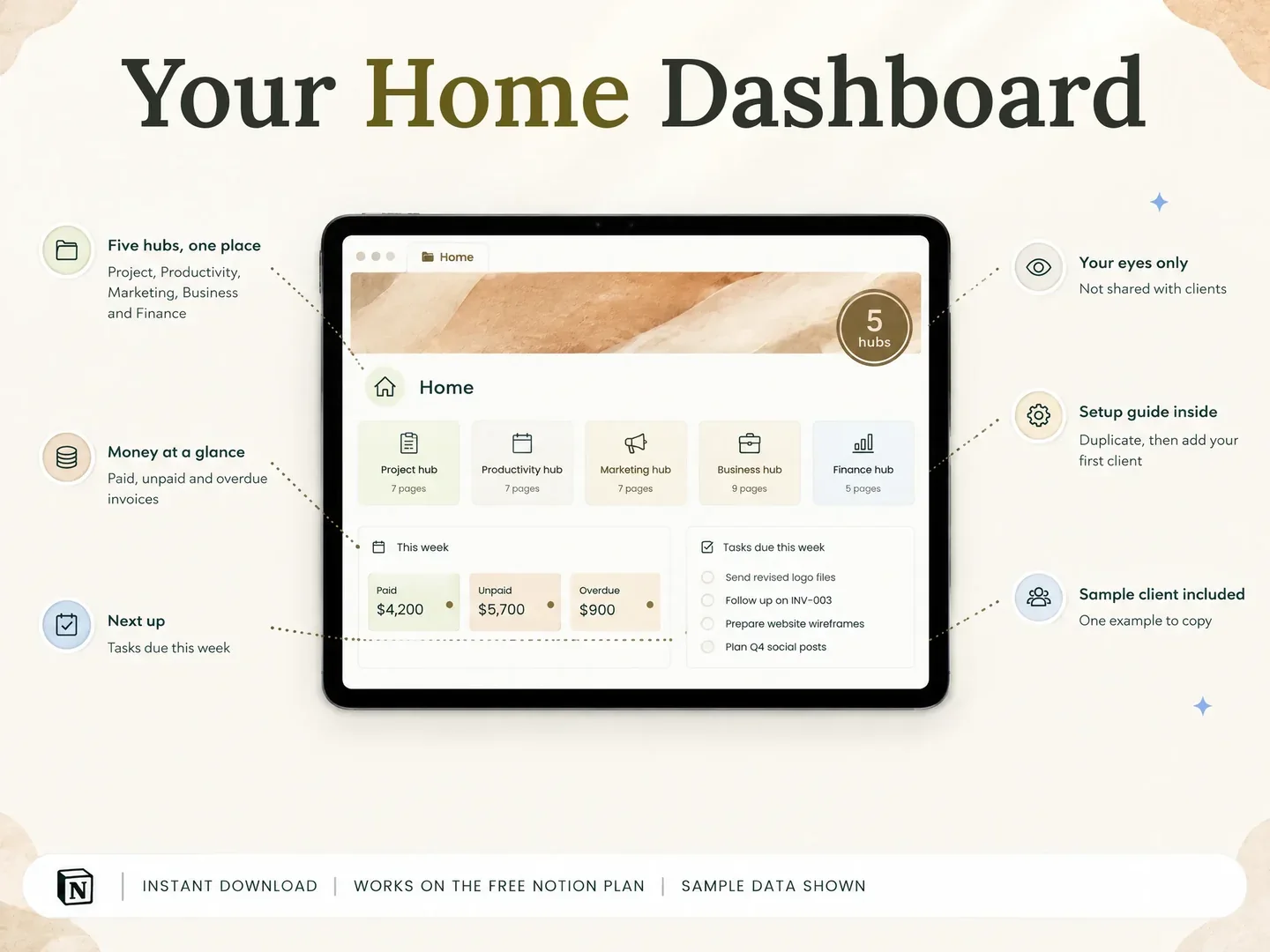
For each live opportunity, add only information that changes what you do next. A useful starter set might be:
- Contact name and a reliable way to reach them
- Stage, such as New, Replied, Proposal sent, Active or Closed
- Last contact date, if you use it to decide when to follow up
- Next action written as a verb, such as send scope or confirm meeting time
- Next-action date, so the item can appear in a review view
- A link to the proposal, project or meeting notes when you need the detail
Use stage names that match your work, and decide when a record moves from one to another. “Proposal sent” could mean you have sent it and are waiting for a reply. The next action might be “check in on proposal” on a date you choose. A status records what happened; the action tells you what to do now.
For example, an enquiry can move from New to Replied to Proposal sent. Once the client accepts, record the project as active and close or update the opportunity. If there is no reply, keep the opportunity open and date the next follow-up. This is a workflow example, not a record from a customer or a feature that Notion performs automatically.
Notion's database properties guide describes fields such as dates, numbers, status and select properties. Its views and filters guide explains how you can filter a view by property values. Test the view with a few records, including a blank date and a closed opportunity, before you rely on it.
Keep clients, projects and proposals connected
Separate records make sense when a client has several projects or one project has its own due dates, tasks and notes. In Notion, a relation can connect pages in different databases. A rollup can summarize selected information from related records. You can begin with a simpler setup and add relations only when looking up the same information becomes awkward.
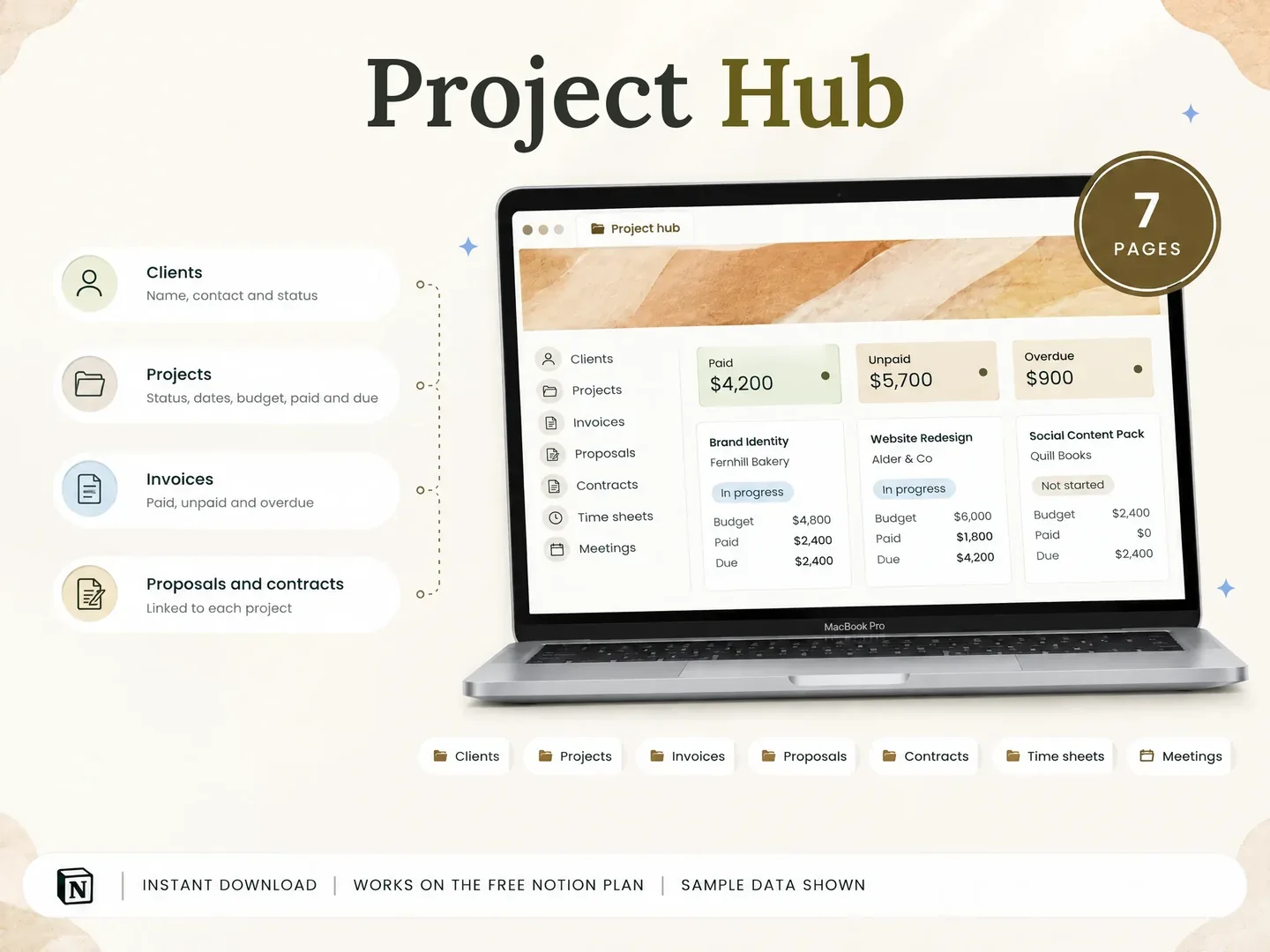
One possible structure is a Clients database, a Projects database and a Leads or Proposals database. A project record can refer to its client. A proposal can remain separate until the work is accepted, then you can create or update the project record. This keeps a draft opportunity from appearing as confirmed work.
Notion's relations and rollups documentation explains that relations link records and rollups display information from related pages. Decide which database owns each fact. For example, keep the client email on the client record and the project deadline on the project record. If you copy both facts everywhere, changes create extra cleanup.
Choose a layout you can maintain in Notion. One database with a type property is a simple starting point. Separate databases give each record type its own fields, though you need to connect them deliberately. If a relation or rollup is unfamiliar, test it with a few sample entries before moving live data.
Make the next follow-up visible
A follow-up becomes easier to act on when its owner, action and date are explicit. In a solo business, you may be both the owner and the person doing the action. Still, writing down the action prevents an open opportunity from becoming a vague note to “check later.”
Create one review view for actions due soon and another for opportunities with no next action. The first can filter for a date range you choose and exclude closed records. The second can show active records where the next-action field is empty. Check that the filters use the fields you update in practice.
Then connect the record to your real communication process. If the next step is a call, put the meeting on your calendar. If it is an email, send it from your email tool and note the result in Notion. A date displayed in a database does not mean a message was sent. Check Notion's sharing and permissions guide before sharing any page that contains client details; access depends on the settings you choose.
If the CRM also needs a money view, use a separate invoice record and keep payment dates and amounts tied to confirmed records. This guide to tracking freelance invoices in Notion explains how to keep the original amount separate from payments received.
Review the pipeline once a week
A weekly review can catch stale dates and unclear next steps, as long as it fits the way you work. Pick a recurring time and scan active leads, proposals waiting for a reply, projects in progress and invoice records that need checking.
For each record, ask:
- Is the status still accurate?
- Did anything change since the last update?
- What is the next action, and when will I do it?
- Is there a source document or conversation to check first?
- Should this record stay active, move to a later date or close?
Close an opportunity when it is no longer live, and keep a short reason if that will help you learn from the decision. Do not delete an old record just to make the current view shorter. A filtered active view can hide closed items while preserving your history.
Keep the review short enough to repeat. Remove fields that do not change a decision. If you often leave the next-action date blank, simplify the rule for setting it. Use a freelance income tracker setup when you want to review finance records alongside the pipeline.
What actually keeps a freelance CRM useful?
The quality of a CRM depends on the records behind its views. A polished dashboard cannot fix a missing status, an old next-action date or a payment marked complete before you check the source. Build a routine around those failure points.
Capture the next action when the conversation is fresh. Add a short verb and date after a call or proposal update. “Wait for response” is less useful than “email about scope on Tuesday” because it tells you what you will do and when.
Keep a clear source for facts. Store the original proposal, signed agreement, invoice or payment confirmation in the tool that holds it. Link the source from Notion if that is useful, then update the CRM record after checking it. Notion is the index you maintain, not proof that the source document changed.
Treat stages as a working agreement with yourself. If you label a proposal “Accepted,” decide what evidence lets you use that label. You might wait for a signed agreement or a written confirmation. The stage should reflect what happened, not what you hope will happen.
For a prepared set of client, project and finance records, Notion Freelancer OS includes client, project, proposal, contract, invoice and meeting records across five work areas. Check the listed contents against the fields you need before changing your setup. It does not claim to send follow-up messages or process payments.
Why Trust This Article
Notion Freelancer OS is published by Cosmo Suite, which built the template. Product details here follow its supplied contents list. Notion database behavior was checked against Notion's own properties, views, relations and sharing documentation on 16 October 2026. We do not claim that the template sends client emails, syncs messages, processes payments or isolates client records. Read About Cosmo Suite for publisher information, use the contact page for corrections, and see the editorial policy for how we prepare articles.
When Notion Freelancer OS is a fit
Notion Freelancer OS may fit a solo freelancer who wants client and project records alongside proposals, contracts, invoices and finance tracking in one Notion workspace. The product includes Project, Productivity, Marketing, Business and Finance areas, plus dated planners and a Canva edit link.
The records are for your own business workflow. They do not create a client-facing page or control separate client access. You enter and maintain the information yourself. If you need email sequences, automatic lead capture, payment processing or accounting treatment, keep those jobs in the service built for them.
If a prepared workspace suits how you work, review the included records and compare them with your current process. Use a small set of your own records first, and keep your original files in their source tools while you confirm the workflow.
Frequently asked questions
What should a freelance CRM track?
Start with a contact or client, the work or opportunity, its current status, and a dated next action. Add a project, proposal, contract, meeting note, or invoice reference when it helps you follow the relationship. Keep the record small enough to update after a real conversation.
Can I use Notion as a CRM for freelance clients?
Yes. Notion databases can hold client and project records, with properties for status and dates and views that filter or sort them. You choose the fields and update the records. A Notion CRM does not automatically collect messages or confirm what a client has paid.
How do I track leads and follow-ups in Notion?
Add each qualified enquiry as a record, then capture its source, current stage, last contact date, next action and next-action date. Use a filtered view to review actions due in the period you choose. Contact the lead through your usual email or call tool.
Do Notion CRM templates send follow-up emails?
A database view can show records that need attention, but that alone does not send an email. Check the specific template and any connected automation before relying on reminders or messages. Notion Freelancer OS is a manually updated workspace template and does not claim to send client emails.
Should a freelance CRM include invoices?
A client record can link to projects and invoice records when you want to see the relationship in context. Keep the original invoice amount and payment confirmation in the tool that issued or received them. Use Notion to organize the status you enter, then reconcile it against those source records.
Is Notion enough for a growing freelance pipeline?
It depends on how many records you manage and which jobs must happen automatically. A small manually maintained pipeline can work in Notion. If you need automatic email capture, scheduled sequences, payment processing, or access rules between clients, compare dedicated software against those requirements.
How often should I review my freelance CRM?
Choose a routine that matches your work. A weekly review can surface dated follow-ups, open proposals and active projects. Update a record after important client activity too, so the next review does not depend on reconstructing the conversation from memory.
Sources
Keep reading
Freelance Admin
Notion Freelancer Template: Choose and Set Up Your Dashboard
notion freelancer template: choose useful client, project and invoice records, set up your dashboard, and build a weekly review you can maintain.
· 9 min read

Freelance Admin
Freelance Invoice Tracker in Notion: Track What's Owed
freelance invoice tracker notion: set up useful invoice fields, record partial payments, spot overdue amounts, and plan clear follow-ups in Notion.
· 9 min read

Freelance Admin
Freelance Income Tracker Template: A Simple Monthly Setup
freelance income tracker template: set up a monthly view for invoiced, received and spent amounts, then review cash flow and open invoices in Notion.
· 7 min read
