Freelance Income Tracker Template: A Simple Monthly Setup
freelance income tracker template: set up a monthly view for invoiced, received and spent amounts, then review cash flow and open invoices in Notion.
By Notion Freelancer OS by Cosmo Suite · Editorial policy
Published · 7 min read

A freelance income tracker template should show which work you billed, which payments arrived and what you spent during a chosen period. Keep those amounts separate, then decide whether your monthly view is for cash planning, invoice follow-up or a simple comparison with your target.
Start with one record per invoice or receipt. Use the date that matches the question you want to answer. A payment date tells you when money reached your account; an invoice date tells you when you billed the client. A spreadsheet or Notion freelancer template for client, project and finance records can hold the structure, as long as you update it from your source documents.
Key Takeaways
- Keep invoiced, received and expense amounts distinct.
- Use payment dates for a monthly cash view and invoice dates for billing activity.
- Mark expected income as a forecast until it arrives.
- Reconcile amounts against your invoice and payment records.
- Treat a Notion tracker as an organizing view, not an accounting or payment system.
Separate billed, received and planned income
A freelance income tracker is a record of billed work, confirmed payments, expenses and expected income for a period. A monthly view is easier to read when each figure has one meaning. “Billed” is the amount on invoices you issued. “Received” is money you confirmed arrived. “Planned” is work or payment you expect later. Keep those figures in separate totals.
| Figure | Date to use | What it tells you | Keep it separate from |
|---|---|---|---|
| Invoiced | Invoice issue date | Work you billed in the period | Cash already received |
| Received | Payment arrival date | Money confirmed in the period | Unpaid invoice balance |
| Expenses | Purchase or payment date | Costs recorded in the period | Income totals |
| Planned | Expected date | A forecast for future planning | Confirmed money |
The table is a planning convention, not a rule for tax reporting. Formal accounting methods and requirements vary. Ask an accountant which dates and categories to use for official records.
For example, an invoice sent in September may be paid in October. September shows what you billed; October shows what arrived. Keeping both dates helps you follow up on the open balance and keep the cash view current.
Choose a simple monthly income tracker layout
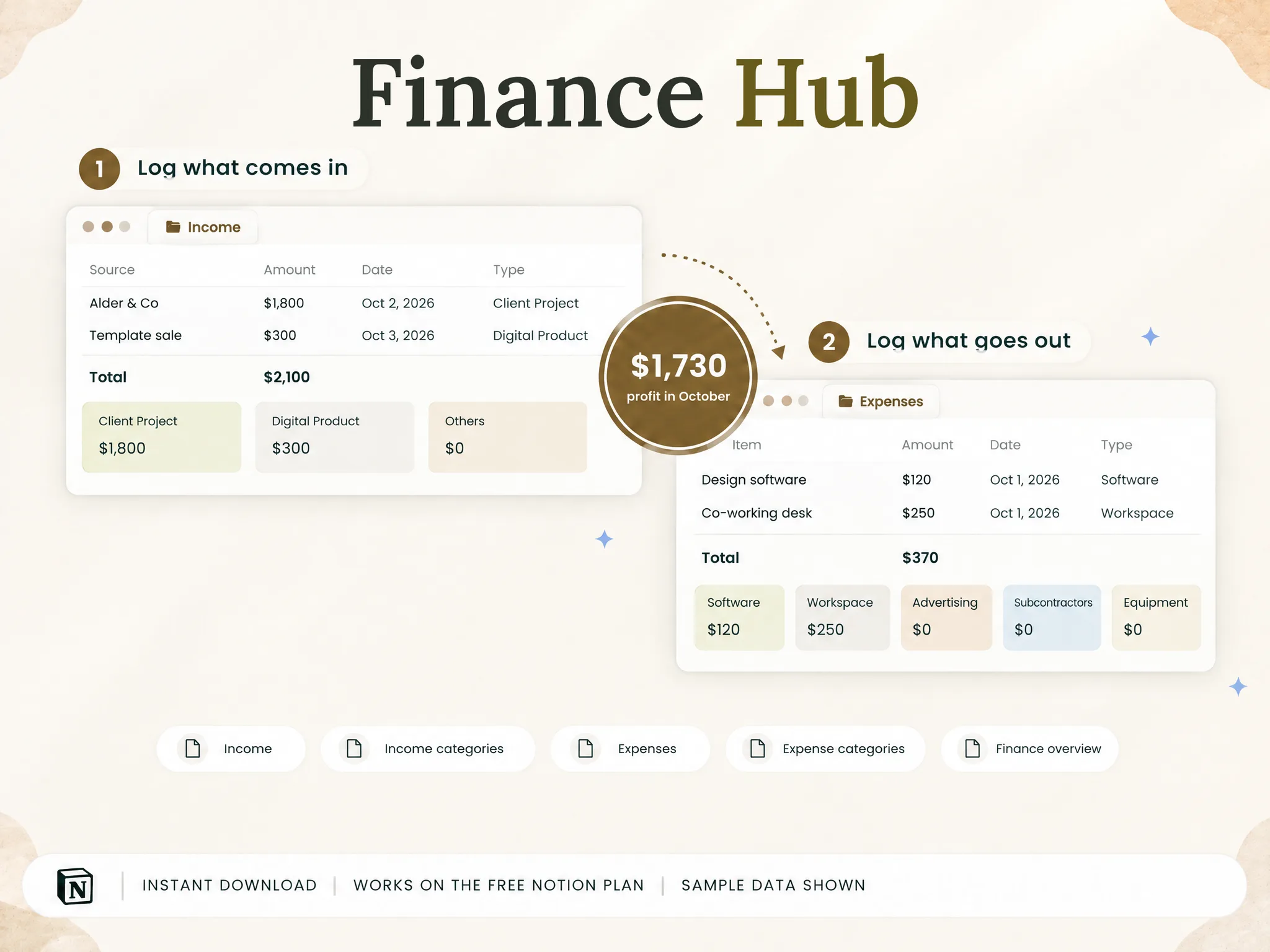
A useful freelance income tracker has one line for each invoice or payment, with a date, client, project, amount and status. Notion databases hold records as pages with properties such as dates and numbers. You can add a category or source link when it helps you check the entry later.
| Record type | Suggested fields | Use it to answer |
|---|---|---|
| Invoice | Client, project, invoice date, due date, amount, status | What did I bill and what remains open? |
| Payment | Client, invoice reference, payment date, amount, source | What money arrived this month? |
| Expense | Date, category, amount, project or receipt link | What costs did I record? |
| Forecast | Expected date, client or project, expected amount, confidence note | What might arrive later? |
The fields above are suggestions for your own setup. Notion Freelancer OS includes invoice and finance records, but check the supplied contents list for the exact layout.
Start with the amount and date fields you will update. A client name and invoice reference make a payment easier to reconcile. If you need to keep the original invoice document, add a link to the authoritative copy. A separate payment row is useful when a client pays an invoice in installments.
Notion's database introduction explains how database items can hold more detail on their pages. Its database property guide lists number, date, select, formula, relation and rollup properties. Use the fields your process supports, and compare the result with the source record.
Group the month by the date that matters
Use a payment date when the view is meant to show cash received in a month. Use an invoice date to see what you billed during that month. If you need both answers, keep both dates and create separate views or totals. A single “month” field is ambiguous when an invoice and its payment fall in different months.
In Notion, a view can filter or sort records without changing the underlying entries. The views, filters, sorts and groups guide explains that each view has its own settings. You could make a monthly receipts view that filters payment records by payment date, then a separate open-invoices view filtered by status.
Use a clear naming rule for periods, such as 2026-10, if you choose to add a month property. Confirm it matches the date field. Avoid typing the same amount into multiple monthly rows; that makes a later correction harder to trace.
A practical monthly view might show these columns:
- Payment date and client
- Invoice reference or project
- Amount received
- Payment source or confirmation note
- A link to the original invoice or receipt
Keep expected payments in a forecast view. Once a payment arrives, record the actual date and amount, then mark or remove the forecast so it is not counted twice. Use your bank or payment service to confirm the deposit before changing the status.
Work through one hypothetical month
Suppose a freelancer has a $1,200 invoice and receives $400 during the month. The payment view records $400 received. The invoice view keeps the original $1,200 and shows $800 still outstanding. If a second $300 payment arrives later, the total received becomes $700 and the remaining balance becomes $500.
These figures are hypothetical and show the arithmetic only. They are not drawn from a customer result or from the template. The cash total for a period should include the payment amount on its arrival date. The invoice amount stays tied to the invoice even when payments arrive in parts.
If the freelancer also records a hypothetical $175 software expense that month, a simple planning calculation is $400 received minus $175 recorded expense, or $225 before other costs and any tax treatment. Call this “cash received less tracked expenses” rather than profit unless your accounting method and complete records support that label.
A tracker can help you compare these entries. It cannot verify a deposit, decide whether an expense is deductible or prepare an official filing. The IRS recordkeeping guide for U.S. small businesses says a recordkeeping system should clearly show income and expenses. If you file elsewhere, check your local tax authority and ask a tax professional about reporting rules.
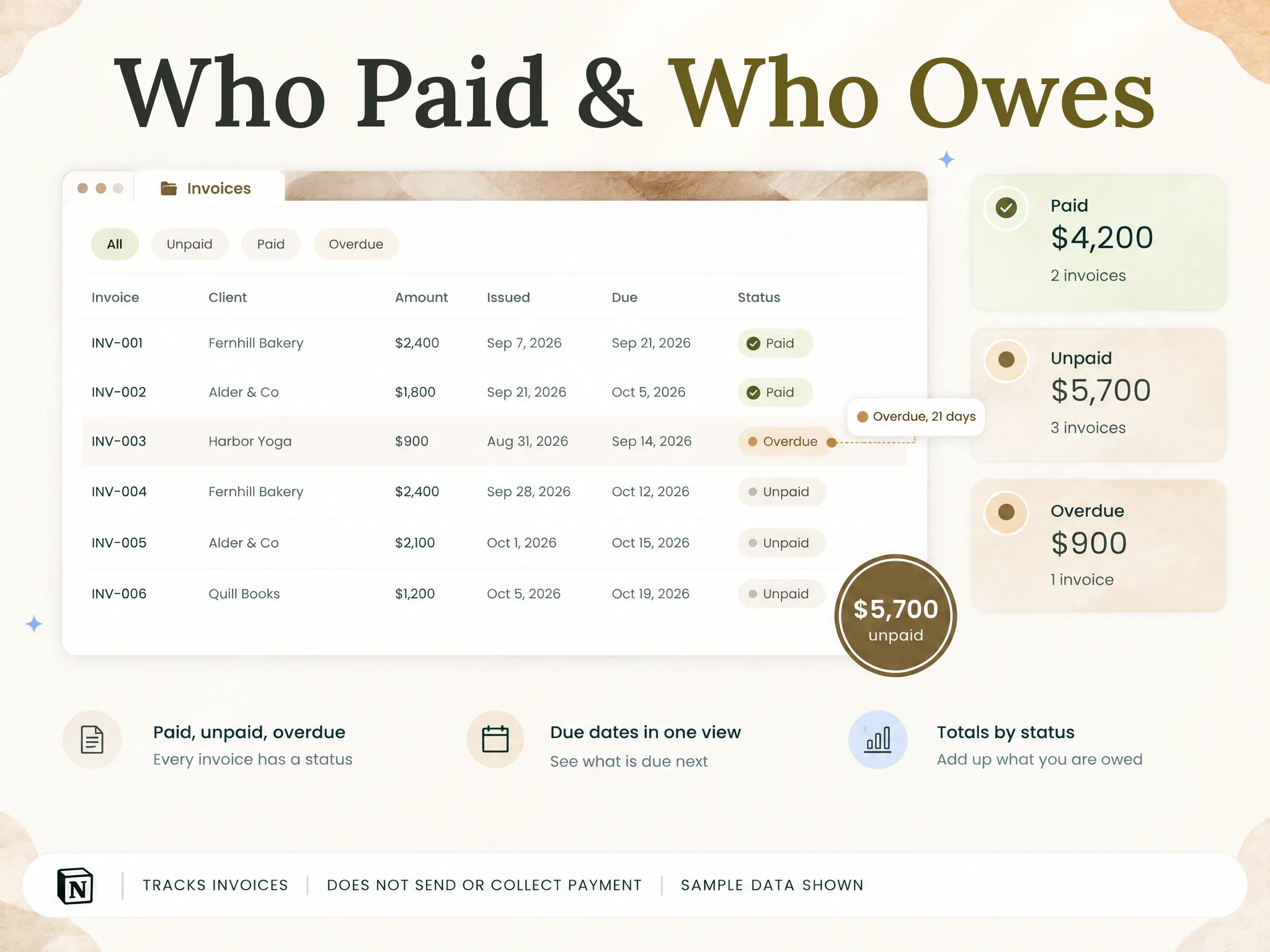
The supplied invoice database is a real product screen. It does not contain the example amounts above.
Review exceptions before you trust the total
A monthly total depends on current entries. Check for payments without invoice references, invoices without due dates, and forecasts that remain after the money arrives. Resolve those exceptions before comparing the month with your target.
A short review can follow this order:
- Match received amounts to bank or payment-service records.
- Update partial payments against the correct invoice.
- Check that each expense has a date and supporting record.
- Move expected amounts to the actual view only after they arrive.
- Compare billed, received and tracked expenses with the previous month or your chosen target.
Keep a note when a number changes because of a refund, correction or late entry. If you use relations between invoice and payment databases, Notion's relations and rollups documentation describes how linked records can be summarized. Test a few cases, including a partial payment and a blank amount, before depending on a calculated total.
Use a freelance invoice tracker in Notion when the open balance and payment follow-up are your main concern. For broader income planning, a Notion workspace with finance and project records can keep those records near the work they relate to.
What makes an income tracker worth maintaining?
The useful tracker is the one you can keep current with the records you already use. If a row takes too long to update, remove fields that do not help you make a decision. Keep invoice dates, payment dates and expenses only when you know how each one will be checked.
Use the monthly review to compare expected payments with money that arrived. Check open invoices and recorded costs. A forecast helps with planning irregular income, but label it and keep it out of confirmed cash totals.
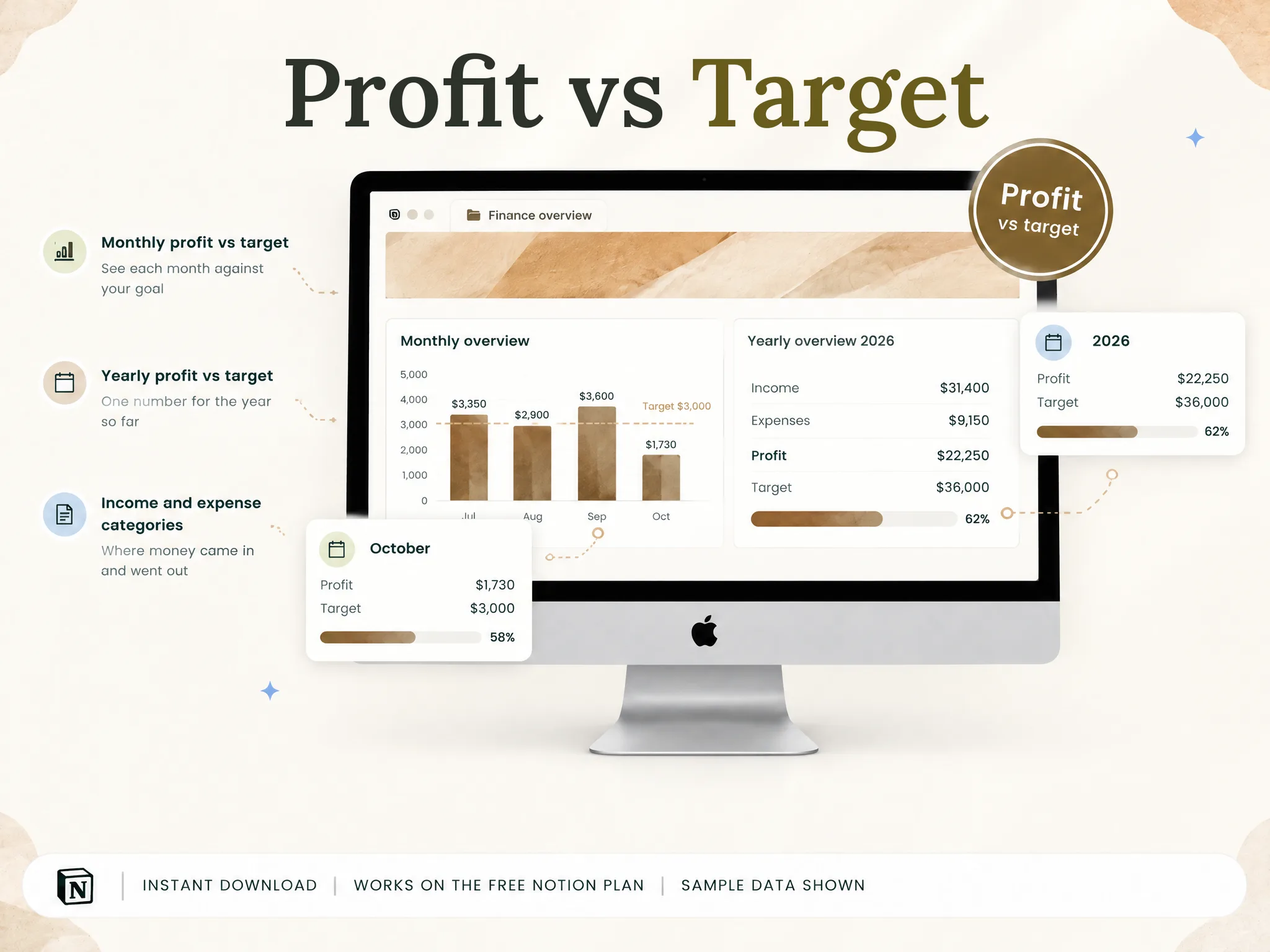
A view that shows monthly and yearly progress against a target can help you see how the period is going. Notion Freelancer OS includes income and expense tracking with monthly and yearly profit-versus-target records. Use the same definitions each month, and verify formal profit calculations with a qualified accountant when you need them for business or tax decisions.
Why Trust This Article
Notion Freelancer OS is published by Cosmo Suite, which built the template. The product details here follow its supplied contents list. Notion database behavior was checked against Notion's own database, property, view and relation documentation on 15 October 2026. This article does not claim that the template syncs with a bank, issues invoices or determines tax treatment. Read About Cosmo Suite, use the contact page for corrections, or see the editorial policy for how we prepare articles.
Where Notion Freelancer OS fits
Notion Freelancer OS can suit a solo freelancer who wants finance records alongside client and project work. Its listed contents include invoice records, income and expense tracking, and monthly or yearly profit-versus-target tracking. It also has project, productivity, marketing and business areas, with records such as clients, proposals, contracts, timesheets and meetings.
Check the contents against the exact fields you need. The template is a place to organize records you maintain. The supplied contents do not claim bank syncing, automated invoice emails, payment collection or client-specific access controls.
If you already use Notion, Notion Freelancer OS provides a starting workspace for freelance admin. Keep your invoicing service as the source for what you billed and your bank or payment service as the source for what arrived. Update the workspace after you confirm each change.
Frequently asked questions
How should I track freelance income each month?
Choose the number you need first. For a cash planning view, record each payment on the date it reaches your account, then total confirmed receipts by month. Keep invoices and expenses in separate fields or records so billed work, money received and costs stay easy to tell apart.
Should I record income when I invoice or when payment arrives?
It depends on what you want the view to answer. An invoice date shows work billed. A payment date shows money received. Track both if you need to compare outstanding invoices with cash received, and follow the method your accountant or local rules require for formal records.
How do I track irregular freelance income?
Keep a record for each invoice or payment and group confirmed receipts by the date they arrived. Use a separate planned amount for expected work, and label it as a forecast. Review the forecast against actual receipts each month so one late payment does not look like money already in the account.
Can Notion add up freelance income?
Yes. Notion number properties can hold amounts, and database views can filter records. Formulas can calculate from properties, while rollups can summarize information from related records. Set up a small sample and compare the result with your source records before relying on it.
Should I include expenses in an income tracker?
You can include expenses in a separate section or related database when you want a monthly planning view. Keep income and costs distinct, and label any difference as a planning figure. A tracker does not determine deductible expenses or replace tax advice.
Can a Notion income tracker replace bookkeeping software?
No. A Notion page can organize the figures and notes you enter. It does not by itself issue invoices, confirm deposits, or establish tax treatment. Use the accounting, invoicing and payment tools you need for official records and payment processing.
How does Notion Freelancer OS fit this workflow?
Notion Freelancer OS includes finance records for income, expenses and monthly or yearly profit-versus-target tracking, alongside invoice and project records. Check the listed contents against the fields you need. It does not claim to sync with a bank or send invoices automatically.
Sources
Keep reading
Freelance Admin
Notion Freelancer Template: Choose and Set Up Your Dashboard
notion freelancer template: choose useful client, project and invoice records, set up your dashboard, and build a weekly review you can maintain.
· 9 min read
Freelance Admin
Freelance Invoice Tracker in Notion: Track What's Owed
freelance invoice tracker notion: set up useful invoice fields, record partial payments, spot overdue amounts, and plan clear follow-ups in Notion.
· 9 min read
Freelance Admin
Freelance Expense Tracking for Tax Time: A Simple System
Freelance expense tracking for tax time works best as a steady record habit. Track dates, amounts and source documents, then review gaps each month.
· 8 min read
